
Archived Page
This page is no longer maintained.
For up-to-date information please see the
new website
Building the Newsletter
Andrew Findlay joined then Editor Fred Russell to produce the Society’s Newsletter 80 (Autumn 2003). Together they transformed our Newsletter to be the exceptional, outstanding, illustrated, full colour magazine it is now. Here Andrew describes the complex skilled process of converting the text and photographs comprising the articles selected by the Editor to create each edition of our Newsletter. This process demands a high degree of awareness of how the Newsletter will appear when it is delivered through your letterbox and how each page needs to be a coherent and interesting story commending your attention. Andrew has brought an alert and imaginative eye to this process and the resounding success of his effort has been a major contribution to the keen expectation of our readers for the next edition to appear. – EdDesign
It all begins with the words. Local news, opinions, reports, history, interviews, anything relevant to people and places in Hitcham and Taplow. The Editor usually has some 'hot topics' that must be covered and some less time-critical subjects to provide a balance. He finds and encourages authors, corrects spelling and grammar, and adjusts the text to match our 'house style' where necessary. A magazine is more than just text and pictures. It has a 'feel' – a visual style – that is consistent from one issue to the next. Our current style is based on a two-column layout with relatively wide margins to give a feeling of space. We use a larger font size than most Sunday supplements and our typography is very conventional: a light serif font, URW Palladio, is used for the text of the articles and a sans-serif font, Nimbus Sans Bold, for the headlines. Italics are used for the titles of other publications, some larger quotations, foreign words in English usage, author’s names and editorial comments.Typesetting
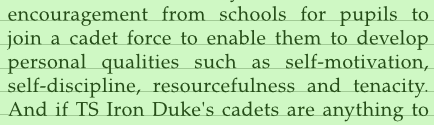
Typesetting a magazine is not like word-processing. I did use a word-processor for the first issue I was involved with (Number 80, Autumn 2003) and it was hard work! Word-processors are for creating text: you should be thinking about the structure and content of what you are writing, and leave the layout to the computer. Page layout works the other way around: you start with a fixed number of blank pages and concentrate on fitting the text and pictures into them in a pleasing way. I use a package called Scribus for this job; it is an open-source (i.e. free) page-layout program that anyone can download from the Internet. The first step is to create a document with a lot of blank pages. I then paste in the text of the articles, starting each one on a new page. This stage is known as the 'galley proof'. In the days of hot-metal typesetting this was the most important stage for correcting errors, as they are easier to fix before the text is broken up into pages. Where there are pictures to go with an article I usually add very small copies to the galley page. Sometimes authors supply pictures, sometimes the Editor or I find them in our collections or take new ones for the Newsletter. A printed magazine exposes all the faults in an image, so I always check that pictures look good when reduced to the size of a postage stamp and also when enlarged to 3 times the size that they will be printed. A PDF file of the galleys goes to the Editor to show how much text we have. Often an article is too long for the available space, and we have to decide whether to edit the text, reduce the number of pictures, or if it is only a little bit over we can squeeze the text by adjusting the 'tracking' (this affects how close together the individual letters will be placed). The job now becomes a jigsaw where the object is to find articles that will fit together to make up complete pages. Photos are moved around and re-sized to fill the space, and pages are placed in a suitable order. After this the footers can be updated to show the date and the page numbers. Some footers interfere with images and get removed at this stage. The Newsletter now looks complete, but there is more to be done. Apparently tiny details can have a big effect on the quality of the final product. You would not bother with these for an office memo, but a glossy magazine is more like a work of art so I spend some time looking at the appearance of the text on the page. The human eye is very sensitive to alignment. You can detect whether two lines on a page 'line up' even if they are some distance apart: scientists call this 'vernier acuity'. To satisfy the eye, article text is aligned on a 'baseline grid' which is in exactly the same place on every page. Similarly, I try to make both columns on the page finish on the same line. The next check is for 'widows and orphans'; these are cases where the first or last line of a paragraph is split off to another column. I also try to avoid a paragraph ending with one word alone on a line. The usual way to fix these problems is to adjust the tracking of a few words or sometimes a whole paragraph. There are limits to this: too much expansion makes the words fall apart visually, and too much compression makes them look cramped and hard to read. Once the paragraphs start and end in good places on the page I look inside them. Sometimes there will be a big gap between words, or a visual 'crack' of white space running down the middle. Tweaking the tracking on a few words usually sorts this out, but if there are a lot of long words close together I may have to put in a hyphen. I try to avoid hyphens though, and all other forms of over-punctuation. My grandfather used to run a printing works, and his advice on punctuation characters was always "if in doubt leave it out".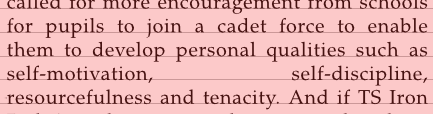
 We use a lot more pictures now than we used to.
Digital technology makes this affordable and the pictures contribute a lot to the appearance of the Newsletter.
Each image has to be checked for quality, and also for technical things like the colour profile used in the file.
Some images run right up to the edge of the paper: this is called 'full bleed' and to make it work I have to make sure that the image continues for a few millimetres outside the finished page area.
Most commercial printing uses over-sized paper and the edges are trimmed off after the magazine has been stapled together, so we don't actually have ink bleeding off into the works of the machine!
We use a lot more pictures now than we used to.
Digital technology makes this affordable and the pictures contribute a lot to the appearance of the Newsletter.
Each image has to be checked for quality, and also for technical things like the colour profile used in the file.
Some images run right up to the edge of the paper: this is called 'full bleed' and to make it work I have to make sure that the image continues for a few millimetres outside the finished page area.
Most commercial printing uses over-sized paper and the edges are trimmed off after the magazine has been stapled together, so we don't actually have ink bleeding off into the works of the machine!